Google Wallet users may soon notice a new bell icon in the app. The Google Wallet notification feed, which began rolling out in October 2026, collects alerts about saved cards and passes in one place. The update also brought increased passport recognition, part of an effort to make Google Wallet more competitive with Apple Wallet. Not everyone has the feature yet, so some users may not see the bell at all.
Where to Find the Notification Feed
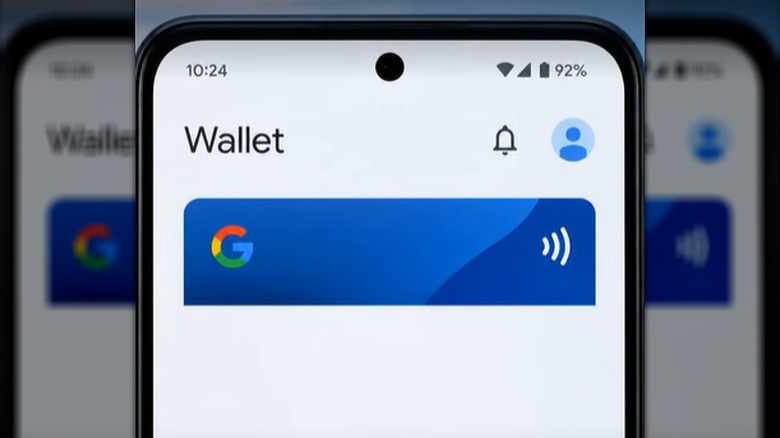
If the feature is available, a bell icon appears next to the profile icon in the top-right corner of the app. Tapping it opens the notification feed. When there are no alerts, the page shows a blank screen with a bell in the center. Otherwise, notifications are listed there.
The feed aggregates messages about updates to saved cards and passes. That includes changes to travel information, such as a gate change on a boarding pass, as well as loyalty and gift card updates like point balance changes. Incoming offers may also appear in the feed. The goal is to keep these notifications organized in one place inside the app.
Why the Feed May Be Welcome
Google Wallet has a reputation for sending a large number of notifications, and the new feed could help users keep track of them. But the feed itself is not the source of every alert. Depending on settings, Google Wallet may use Nearby Notifications, which can send offer updates based on how close a user is to a certain location. Some saved cards may trigger these updates.
For users who want fewer interruptions, the notification feed is not the right target. Instead, they need to adjust notification settings or remove the app’s ability to use location data.
How to Manage or Disable Notifications
There are two main ways to control alerts from Google Wallet. Both are accessible from the app or from the phone’s system settings.
From within Google Wallet
Tap the profile , then go to Wallet settings and select Manage Wallet Notifications. From there, adjust the settings as desired.
From phone settings
Open Settings, then Apps, then Google Wallet. Choose Notifications to turn all notifications off, or choose Permissions to deny Google Wallet access to location. Either option can reduce or stop the alerts.
The notification feed is still rolling out, so users who do not see the bell icon may simply not have received the update yet.