An iPhone password leak warning is designed to get your attention, but it is not proof that your device was compromised or that someone has broken into your accounts. Instead, it signals that a password saved on your phone matches one found in a known data leak. The alert is a prompt to review and update credentials, not a confirmation of a hack.
How Apple's Passwords App Flags Leaked Credentials
The free Passwords app, introduced in iOS 18, keeps logins and passkeys in one place and can sync them through iCloud Keychain with end-to-end encryption. For iPhone users already inside Apple’s ecosystem, it offers a way to create strong passwords and autofill them across websites and apps. Windows users can reach iCloud Passwords through Chrome or Edge after installing iCloud for Windows and the browser extension.
To check for compromised credentials, the iPhone first compares saved passwords against a local list of commonly leaked passwords. Passwords not on that list go through privacy-preserving cryptographic checks with Apple’s servers. Those checks send information derived from the password rather than the password itself, and Apple says it does not retain that information.
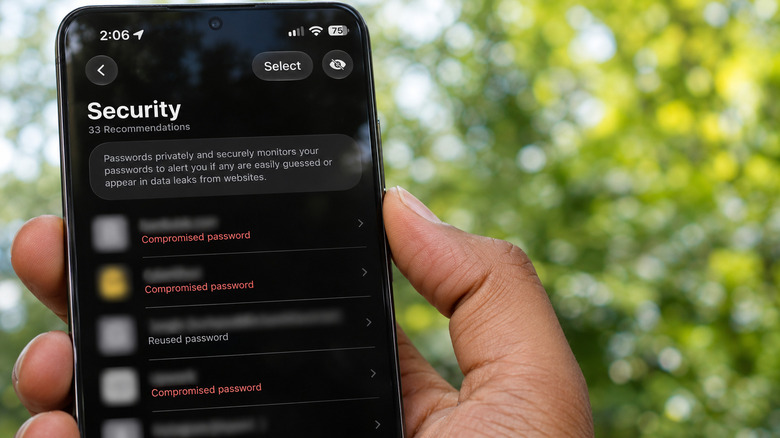
A warning does not identify where a password leaked. That matters because reusing a password across a forum and a bank account means a breach at the forum could put the more important account at risk. Apple also flags weak or reused passwords, even when they are not tied to a known leak.
Other password managers offer comparable features. Google Password Manager performs similar checks in Chrome on iPhone, though it only examines passwords saved with Google. 1Password and other managers provide similar monitoring as well.
Finding and Fixing Flagged Accounts on iPhone
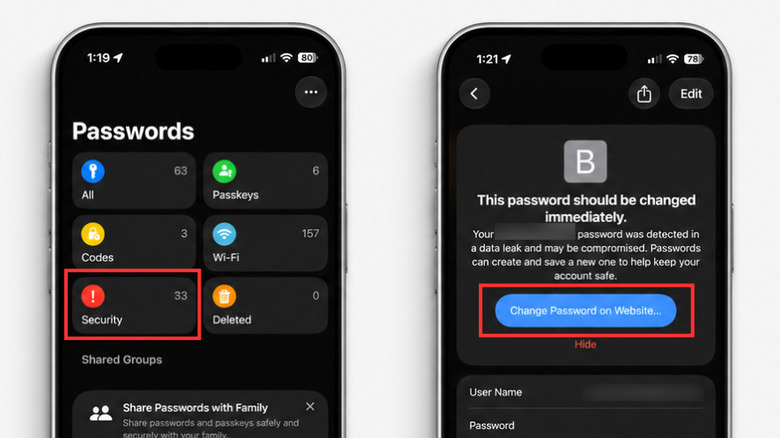
The Passwords app puts security alerts in a dedicated section rather than burying them in Settings. To review them, open Passwords and authenticate with Face ID, Touch ID, or your passcode. Then tap Security to see accounts with flagged passwords. If the category is not visible, return to the app’s main screen.
Select an affected account to see whether its password is marked as leaked, reused, or weak. Tapping Change Password takes you to the service’s website or app, where you can replace the exposed credential with a unique one.
Changing the password inside the Passwords app alone will not update your account. The password must first be changed on the website, and then the saved credentials in the app must be updated to match. Most password managers detect the change and offer to update their stored information.
If a password has been reused across multiple accounts, change it everywhere it appears, with particular attention to email and banking accounts. Passkeys can replace traditional passwords on sites that support them, and two-factor authentication adds another layer of protection.
Make Sure Compromised Password Detection Is On
Users who have relied on the Passwords app for a while without seeing alerts should confirm that monitoring is enabled. The setting is found under Settings, then Apps, then Passwords, then Detect Compromised Passwords.
Ignore Fake Leak Alerts
Apple’s warnings are legitimate, but suspicious emails, texts, or browser pop-ups claiming a password has leaked are not. Do not follow their links. Check the Passwords app instead. Hiding a security recommendation does not fix the password behind it, and falling for a fake alert can create separate problems.