
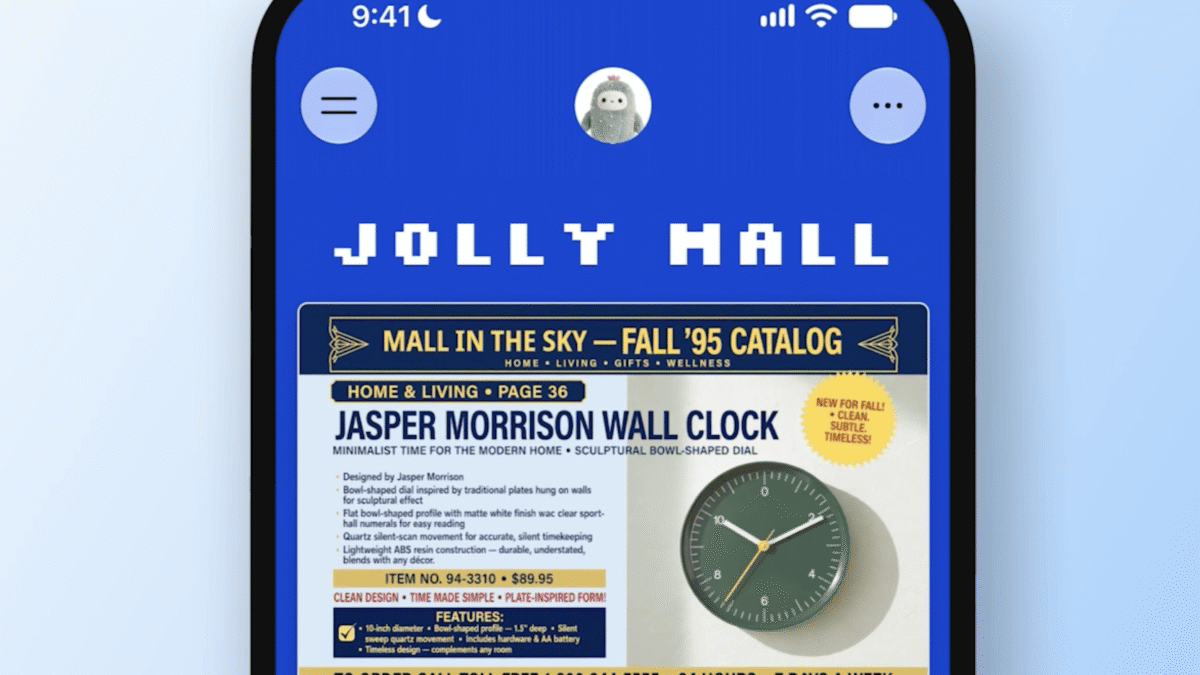
Meta has added a feature called spaces to its Muse AI assistant, giving users the ability to assemble app-like experiences directly inside the Muse app. The new Meta Muse AI spaces can take the form of a shopping hub, a school dashboard, a music tracker, a trivia game, and other personalized setups, all built through conversation with the assistant.
The rollout is available to every Muse user, and Meta is already exploring ways for people to share their spaces with others and collaborate on them.
Describe it, and Muse builds it

Creating a space starts with a description. A user tells Muse what they want, and the assistant constructs the experience. Once an outside app is connected to Muse, the assistant can keep pulling information from that service in the background. Meta lists Gmail, Google Calendar, OpenTable, and Notion among the apps Muse works with. That continuous connection means details such as prices and dates can refresh on their own inside a space, without the user manually updating them.
Spaces are not just for viewing. Users can check items off, add notes, and make edits to the elements inside them, turning each space into a working surface rather than a static display.
Placement and scheduling controls

Meta is also giving users control over where and when their spaces appear. A space can stay in the sidebar, move into the main tab, or be scheduled to show up at particular times. Meta’s example is a weekly planner that sits up front during the workweek and then gives way to weekend plans on Saturday.
That scheduling option matters because it lets one Muse setup shift with a person’s routine instead of forcing a single fixed layout for every day.
New memory and focus capabilities

Alongside spaces, Meta announced that new Active Memory and Active Focus capabilities from its Muse Wonder AI model are coming to the Muse app and the Meta AI chatbot. Active Memory is designed to help Muse recognize when earlier information becomes relevant during a conversation. Active Focus is intended to improve how the assistant works toward goals.
Taken together, the additions point to a Muse that carries more context across interactions and stays oriented toward what a user is trying to accomplish, while spaces provide a place for the results to live.
What the update means for Muse users
The spaces feature moves Muse beyond a purely conversational assistant and toward a customizable workspace. A shopping hub can track prices, a school dashboard can organize dates, and a music tracker can keep listening information in one place. Because connected apps feed information in continuously, those spaces can stay current without repeated manual input.
For now, the collaborative side remains a work in progress. Meta says it is looking into sharing and collaboration options, but spaces are already rolling out to all Muse users.


