Finding the best touchscreen gloves means balancing warmth, grip, and the ability to tap and swipe without baring your fingers to the cold. A recent round of cold-weather testing put several pairs through calls, web browsing, and text messages in 30- to 40-degree Fahrenheit conditions, with comfort and durability also under scrutiny. The results show that conductive materials and smart fingertip design can make winter phone use far less frustrating, though no single pair excels at everything.
Top pick for accuracy and control

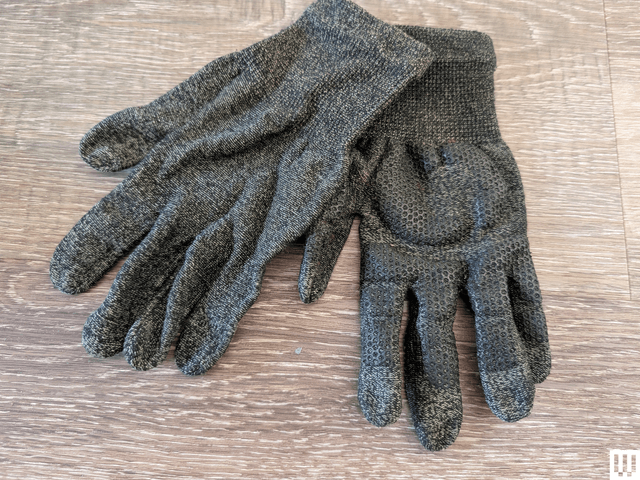
Glider Gloves earned the strongest overall recommendation for touchscreen performance. The Canadian brand weaves conductive copper into its yarn, so the entire hand can interact with a screen rather than just the fingertips. That means tapping, swiping, pinching to zoom, and typing with any finger all register reliably.
The soft brushed interior feels seamless, and textured silicone sections on the palm and fingers keep a phone from slipping. The trade-offs are warmth and weather protection: the gloves are thin, so they suit milder cold rather than extreme temperatures, and they are not waterproof. Sizing runs small at first but loosens with wear, and the snug fit is part of what makes typing accurate. Because they are popular, they sometimes sell out.
Best for wet weather

Cross Point Gear’s Waterproof Knit Gloves are aimed at cyclists, dog walkers, and anyone who spends time outdoors in rain or snow. The touchscreen fingertips performed extremely well in testing, supporting both typing and swiping with precision. A tight, molded fit and silicone grips help with accuracy and phone security, though getting the right size matters.
These gloves are relatively lightweight but warmer and thicker than the Glider pair. Their three-layer construction combines a dense knit exterior, a breathable Artex membrane that blocks water, and a moisture-wicking liner inside. They stayed dry in heavy rain and even during brief submersion, although the outer layer eventually soaks through.
Knitted comfort with caveats

Moshi’s Digits Touchscreen Gloves are a strong choice for anyone who prefers a knitted style. They are warm and comfortable, and the touchscreen capability works across all fingers and thumbs, allowing fairly accurate typing. Wavy rubber strips improve grip on the otherwise slippery knit fabric.
Durability is the weak point. The inner microfleece lining can separate from the knitted outer layer, and the loose weave frayed in testing after a finger caught on something during a snowball fight. Keeping them dry and handling them carefully will extend their life.
Fingerless flexibility for fast typing

The Heat Company’s Heat 2 Softshell Gloves address a common touchscreen-glove problem: even responsive gloves can feel clumsy for speed typing, and many phones rely on fingerprint unlocks. These fold-over mittens are wind- and water-resistant, with goatskin leather palms and long cuffs.
Two separate fold-back sections—a mitten top with a hand-warmer pocket and a thumb cover—use sewn-in magnets to stay out of the way when open. That allows exposing only the thumbs, which is ideal for unlocking a phone and typing with both thumbs. They are decently warm on their own and can be paired with Merino Heat Tube Liners for extra cold.
Leather looks with touchscreen function

Kent Wang’s Deerskin Touchscreen Gloves suit a more polished wardrobe, available in black, dark brown, and tan. The deerskin leather resists wrinkles and is durable, and a manufacturer-applied touchscreen-friendly treatment is designed not to wear off.
Touchscreen use works well, but fingertip seams made typing take practice, and a snug fit gives the best results. A cashmere lining adds comfort and explains the higher price. These gloves can handle rain and the occasional snowball.
Heated gloves for deep cold

Venustas Heated Gloves are the pick for people who need serious warmth. Each glove has three heat settings controlled by a color light-up button, a cozy fleece lining, an adjustable tight fit, and a nonslip palm. The fingertips handle tapping and swiping, but the chunky build makes typing tricky. A plastic clip keeps the pair together when off.
Each cuff holds a zipped battery compartment, so charging is a routine to remember. The lowest setting can run up to 10 hours but was not warm enough in biting coastal wind during testing, while the high setting lasts only three hours.
Also tested, with mixed results

- Verloop Twist Knit Touchscreen Gloves: Vibrant color combinations and cozy ribbed cuffs, with touchscreen tips on the thumb, index, and middle fingers. A snug fit is needed for fast typing and thumb use. Machine washable but not waterproof.
- Black Diamond Lightweight Screentap Gloves: Thin enough for dexterity, with a suede palm patch for padding and an elasticated wrist. Thumb-based touchscreen use supports one-handed operation, and typing approaches normal speed. Not especially warm and somewhat slippery.
- Graphene-X All Rounder Bio-X Gloves: A distinctive mix of graphene material and plant-based bio leather, comfortable but poor at retaining warmth. Touchscreen input works, but joins and squared-off fingertips made accurate typing nearly impossible.
- Trendoux Winter Gloves: An affordable option with touchscreen tips on the index fingers and thumbs. Interior seams made typing awkward and slightly uncomfortable. Slim and not very warm, but smooth, water-resistant, and finished with anti-slip dots and a clip.
When gloves are not the answer

Two alternatives can help when touchscreen gloves do not fit the bill. A stylus allows accurate phone use without removing gloves and works with any smartphone; the Bargains Depot 2-in-1 Stylus performed well in testing. A rechargeable hand warmer kept in a pocket can also supplement thinner gloves or gloveless hands.
Before you buy

Increasing a phone’s touchscreen sensitivity can improve the experience with any pair. On Android, look under Settings, Display and touch, Touch sensitivity, and enable increased sensitivity. On iPhone, go to Settings, Accessibility, Touch, and adjust Haptic Touch or 3D & Haptic Touch to the fast setting, and consider the Touch Accommodations options.